Support & FAQ
How do I contact a human?
Email [email protected]. It's a small operation (one person), so please be patient on reply times — see the Terms for the formal “no SLA” language.
Common questions
How do I turn it on?
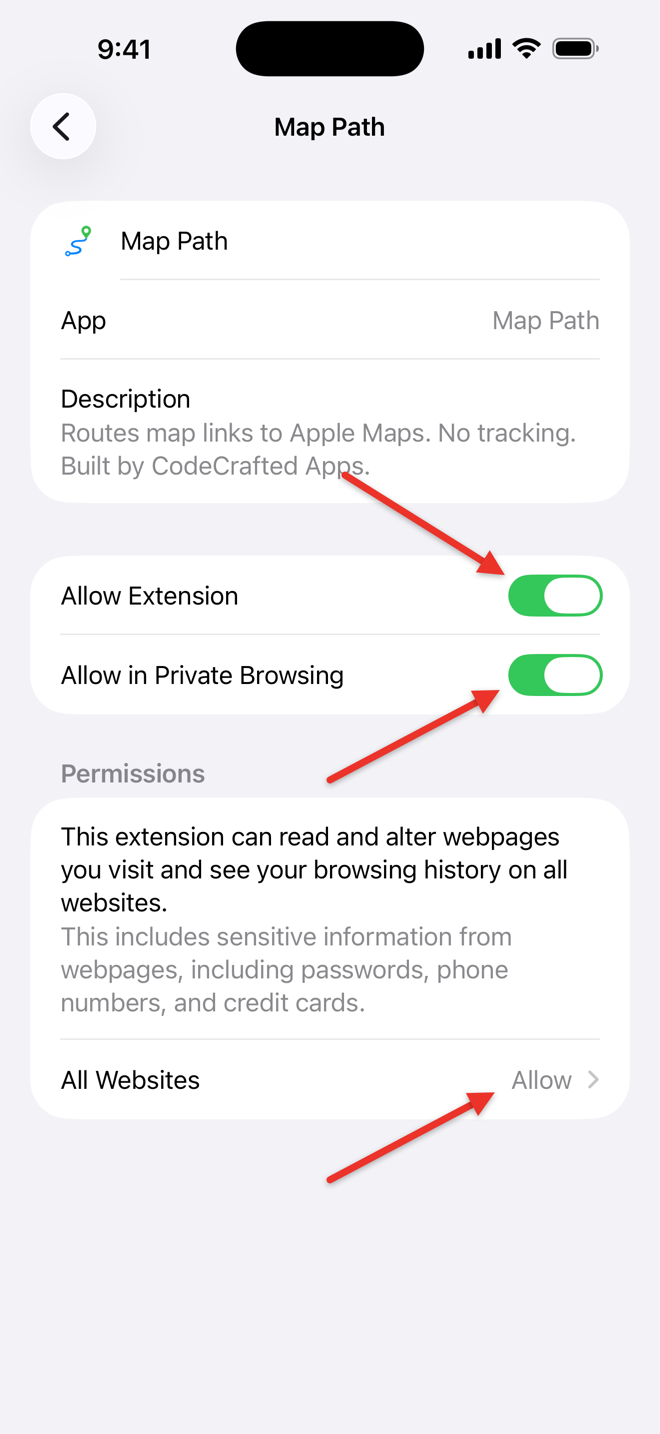
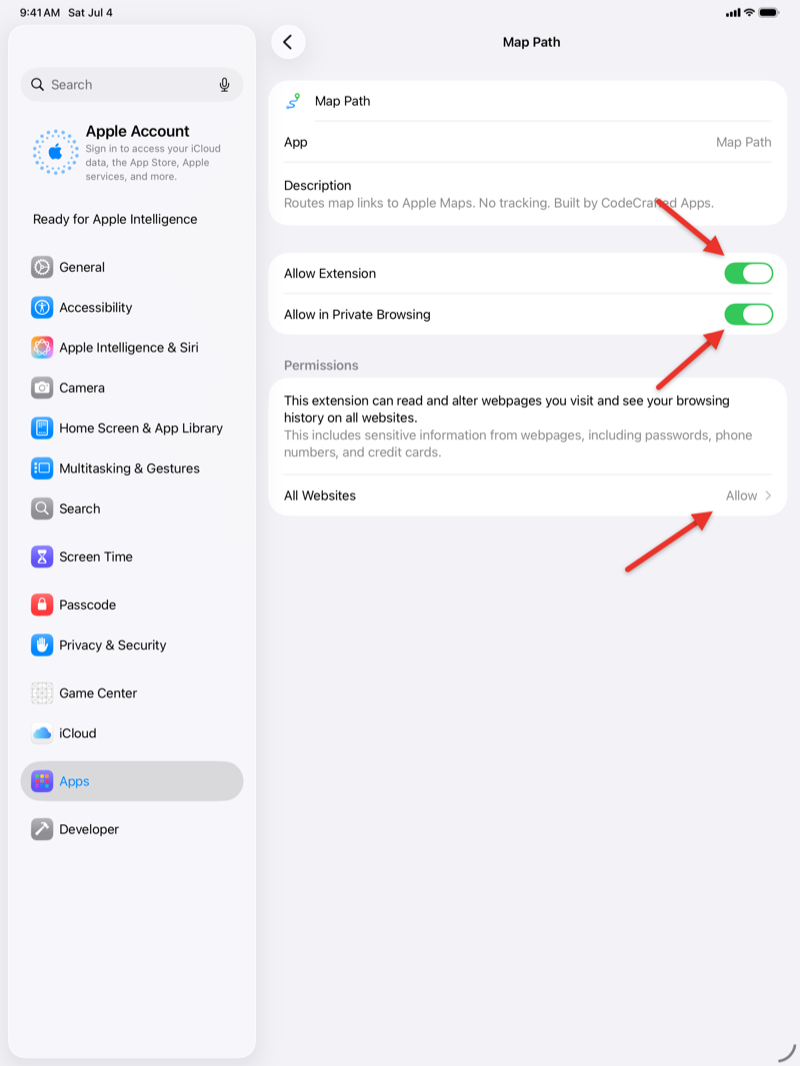
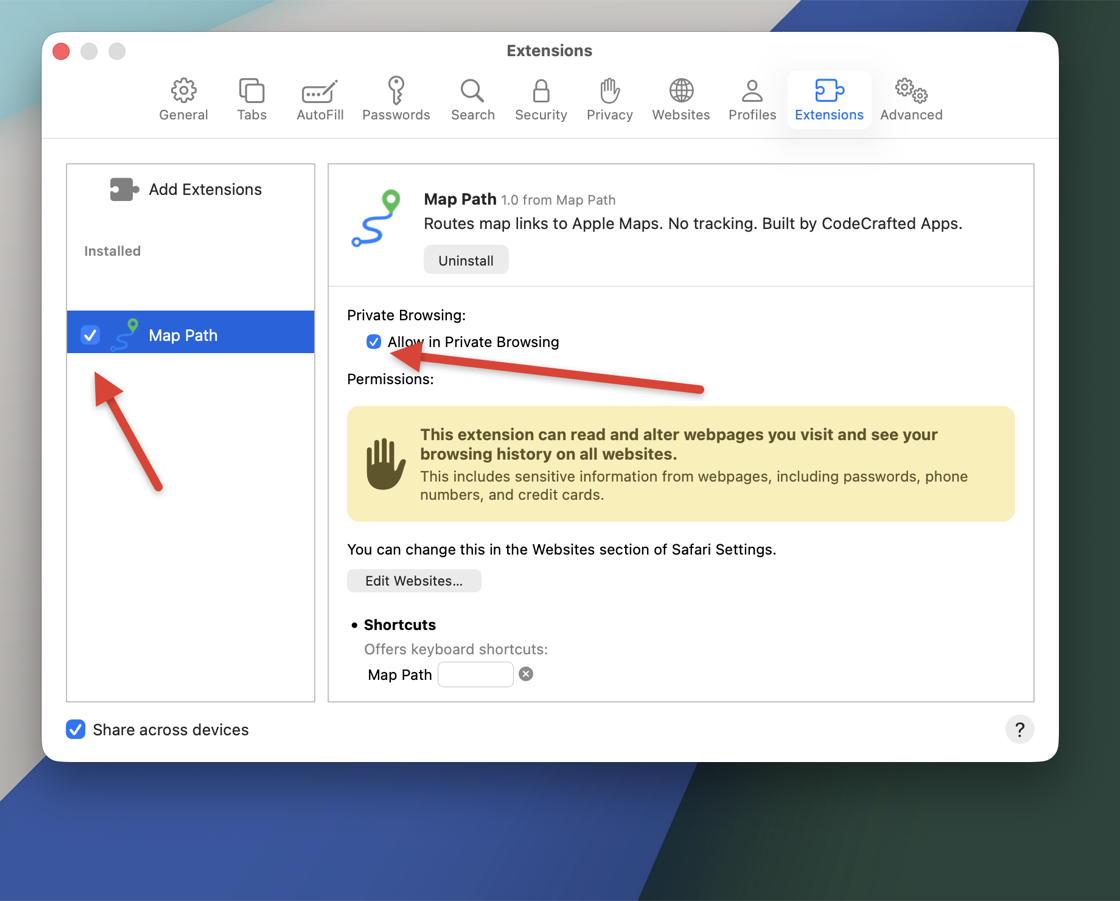
After installing from the App Store, Map Path has to be switched on inside Safari's settings — Apple requires that you, not the app, grant an extension its permissions. The screenshots below show the exact switches. (The Map Path app's Set-up steps screen walks you through the same thing, and its Open Settings button jumps you straight to the right page.)
iPhone
- Open Settings → Apps → Safari → Extensions and tap Map Path — or just tap Open Settings in the Map Path app.
- Turn on Allow Extension.
- Set All Websites to Allow (not Ask) — this is the step people miss.
- Optional: turn on Allow in Private Browsing to cover Private tabs too.
iPad
Same three switches, same place — Settings → Apps → Safari → Extensions → Map Path:
Mac
- In Safari, choose Safari → Settings (⌘,), then click Extensions.
- Tick the checkbox next to Map Path.
- When Safari asks about website access, choose Always Allow on Every Website — that permission is what lets Map Path see and rewrite map links.
How do I use the address finder? (new in version 1.2)
The finder lists the street addresses it spots on the page you're reading — handy when a page shows an address as plain text with no map link at all, or a link Map Path can't translate (like Google's search results).
- iPhone / iPad: tap the extensions (puzzle-piece) button in Safari's address bar, then tap Map Path. Mac: click the Map Path button in Safari's toolbar.
- The popup lists the potential addresses it found on the page.
- Tap one — it opens in Apple Maps.
Twenty-five seconds, start to finish, on an iPhone:
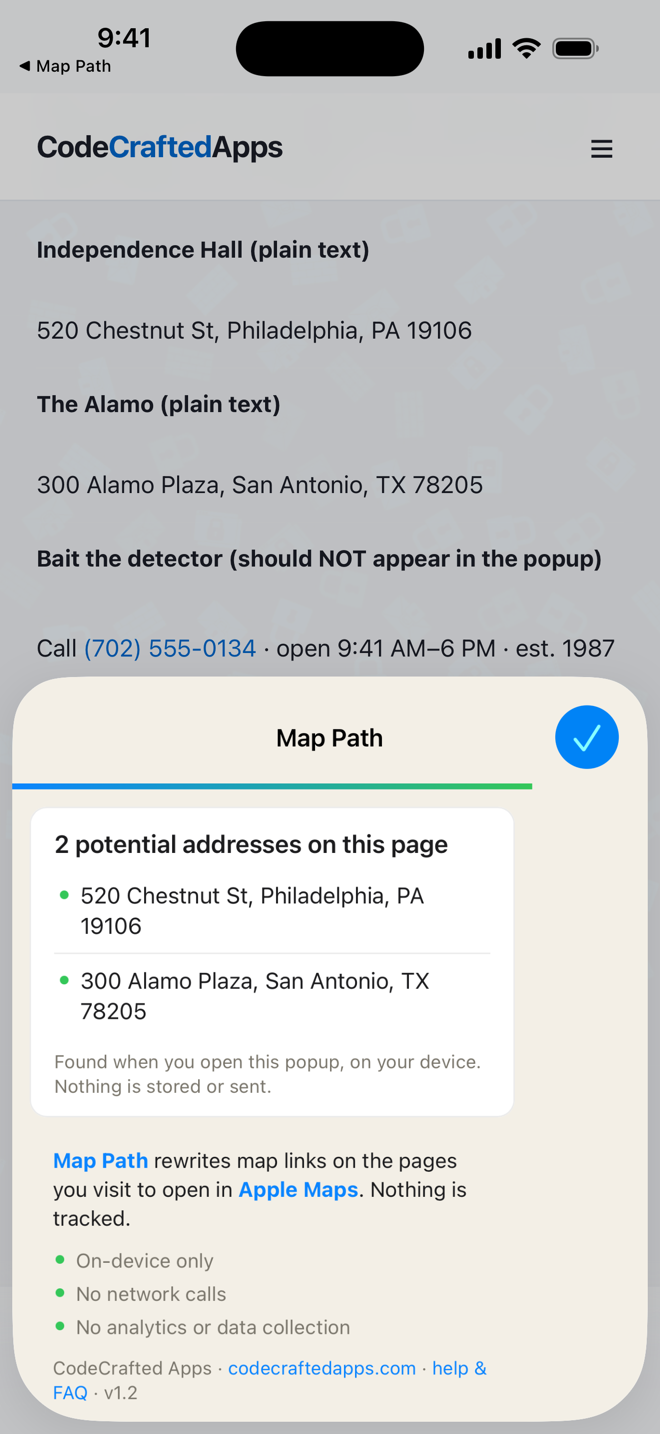
The page is read only while the popup is open, and the reading happens entirely on your device — nothing is sent anywhere, same as the rest of Map Path.
I clicked a Google Maps link and it still opened Google. Why?
A few possibilities:
- The extension may not be enabled, or not permitted on that site — check the steps above.
- The link was a shortened map link (for example
maps.app.goo.gl/…). Map Path doesn't follow shorteners, because that would require a network request it deliberately never makes, so those are left alone. - The link used an unusual format Map Path couldn't translate confidently. When it isn't sure, it leaves the original link rather than risk the wrong destination.
- The page opened the map itself (for example a button that runs a script), rather than using a normal link. Map Path rewrites link addresses; it doesn't intercept scripted navigation.
If a common, normal-looking link isn't being rewritten, that's worth reporting — email the link (with anything private removed) to the support address and I'll take a look.
I tapped a place in Google search results and it opened Google Maps. Why?
Google's search-results links (the map pack, knowledge panel, and “Directions” buttons there) often contain no address or coordinates at all — just Google's internal ID for the place, which only Google's servers can decode. Translating it would require a network request, and Map Path makes none. From version 1.2, when such a link’s own visible text is a street address, Map Path rewrites it from that address; links labeled “Directions” or with just the business name are left alone rather than guessed at — the same rule as shortened links.
The one-tap alternative: the result usually shows the address as plain text right on the page. Open the Map Path popup (the toolbar button) — it lists the addresses it finds on the page, and tapping one opens it in Apple Maps. See How do I use the address finder? above for a short video of exactly that.
The page has a Google Map embedded right on it — why isn't that switched to Apple Maps?
When a website embeds an interactive Google Map directly into the page (the kind you can pan and zoom in place — common on hotel sites, restaurant pages, and event listings), Map Path leaves it untouched. Two reasons:
- Apple doesn't publish a web-embed equivalent to Google's Maps Embed API, so there's no Apple Maps widget to swap to.
- Apple Maps links can't be loaded inside an embedded frame — Apple's servers block this across the web, not just for this extension.
The action that matters — a nearby “Get Directions” or “Open in Maps” link — still gets rewritten when you click it.
Does it send me to the wrong place?
It tries hard not to. When a link's destination can't be translated cleanly, Map Path leaves the original link untouched instead of guessing. Always confirm a destination in Apple Maps before relying on it, the same as you would with any map link.
What data do you collect?
None. See the Privacy Policy for the full breakdown. The TL;DR: zero data collection, zero analytics, zero network requests, and nothing stored on your device.
Can I trust that there's no tracking?
Yes. Beyond the privacy policy, Safari itself shows you exactly what Map Path is allowed to do, and the source is public. The extension makes no network requests, so it has no way to send anything anywhere even in principle.
Does it work on Chrome or Firefox?
Map Path is built for Safari on Apple platforms first. If versions for other browsers happen later, they'll get their own listings.
How do I uninstall?
Map Path installs as part of a small container app from the App Store. Remove that app the way you remove any app:
- macOS: drag the Map Path app from Applications to the Trash, or remove it from Launchpad.
- iPhone / iPad: touch and hold the Map Path app icon, then Remove App.
Because Map Path stores no personal data, there's no leftover data to clean up afterward (removing the app removes its one on-device flag too).
Reporting a problem
If you find a bug, a link format that should be supported, or a security issue, please email [email protected] with the details. I'll respond as quickly as I can and credit you in the release notes if you'd like.